Electron 使用初体验
关于 Electron 的流水账记录
上手和使用
下载 electron-quick-start 仓库到本地,基于该仓库进行开发
# Clone the Quick Start repository
$ git clone https://github.com/electron/electron-quick-start

# Go into the repository
$ cd electron-quick-start

# Install the dependencies and run
$ npm install && npm start
在 quick start 中,入口文件 main.js 使用了 Electron 的 API 调起了一个 BrowserWindow 的实例,并在这个实例中,打开了一个在本地的 HTML 文件 index.html:
function createWindow () {
  // Create the browser window.
  mainWindow = new BrowserWindow({width: 800, height: 600})

  // and load the index.html of the app.
  mainWindow.loadURL(url.format({
    pathname: path.join(__dirname, 'index.html'),
    protocol: 'file:',
    slashes: true
  }))

  // Open the DevTools.
  // mainWindow.webContents.openDevTools()

  // Emitted when the window is closed.
  mainWindow.on('closed', function () {
    // Dereference the window object, usually you would store windows
    // in an array if your app supports multi windows, this is the time
    // when you should delete the corresponding element.
    mainWindow = null
  })
}
接下来的事情就交给这个 HTML 文件了,你可以根据自己的实际需要随意编写,在 base64-convertor 这个应用中,我需要在前端展示一个 “一键转换” 的功能,所以需要一个输入框和一个输出结果的框,以及一个 “转换” 按钮。
<div class="column">
    <div>
        <textarea class="box" id="input"></textarea>
    </div>
    <button id="convert" class="btn">转换</button>
</div>
<div class="column">
    <div id="output" class="box"></div>
</div>
然后我们需要在点击转换按钮时,调用 js-base64 的 API 将用户输入的字符串进行转换。首先在 index.html 里面引入 JS 脚本:
<!DOCTYPE html>
<html>
  <head>
    <!-- 省略... -->
  </head>
  <body>
    <!-- 省略... -->

    <script>
        // You can also require other files to run in this process
        require('./renderer.js')
    </script>
  </body>
</html>
注意到我们可以直接在页面内使用 require 方法,这个和一般的 Web 网页开发有所不同。在 renderer.js 里面我们编写实际的逻辑:
// renderer.js

const Base64 = require('js-base64').Base64

let inputEl = document.getElementById('input')
let outputEl = document.getElementById('output')
let convertBtn = document.getElementById('convert')

convertBtn.addEventListener('click', () => {
    const val = inputEl.value
    const output = Base64.encode(val) // 调用 API

    outputEl.innerHTML = output
})
然后就可以了~~
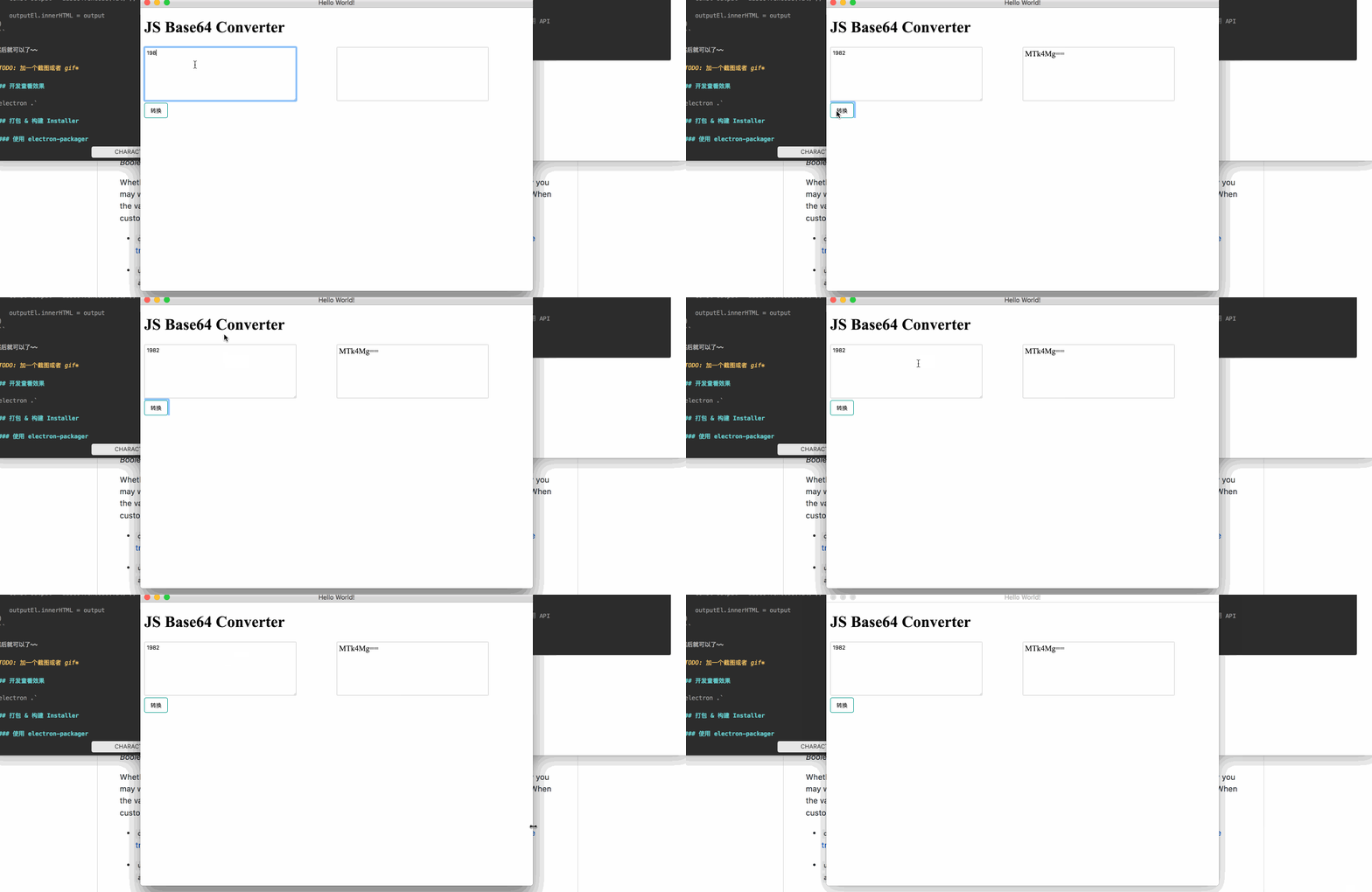
开发查看效果
electron .
打包 & 构建 Installer
使用 electron-packager 来进行打包,然后对应 MacOS 和 Windows 不同平台,需要用不同的构建 Installer 方法。以下操作都在 MacOS 上执行。
Building Mac OS App
这里我们使用 electron-installer-dmg 来构建 MacOS 的 installer,其中参数的含义为:
asar=true:在打包过程中使用 asar,将应用的源代码打包成一个压缩包--overwrite:总是覆写原有路径上的同名文件--platform=darwin:构建 Mac OS 应用(若需要在 Mac Apple Store 上架则需要指明是mas)--out=builds:输出到builds/目录下
# 打包应用
ELECTRON_MIRROR="https://npm.taobao.org/mirrors/electron" electron-packager . --overwrite --asar=true base64-convertor --platform=darwin --out=builds

# 构建安装包(Installer)
electron-install-dmg --out=installers --overwrite ./builds/base64-convertor-darwin
值得一提的是,应用的名字不可以超过 27 个字:https://github.com/LinusU/node-appdmg/issues/48
Building Windows App
在 Mac OS 系统上构建 Windows 应用,需要的步骤会更繁琐一些。其实我觉得必要性也不是太大
本着尝试的态度,还是试了一下整个流程,这里仅列出打包 win32 的操作,win64 的并没有尝试。
准备工作:下载 Wine, Mono
在非 Windows 平台中,需要 提前安装 wine 和 mono:
brew install wine
brew install mono
打包应用
ELECTRON_MIRROR=\"https://npm.taobao.org/mirrors/electron/\" electron-packager . --overwrite --asar=true base64-convertor --platform=win32 --out=builds构建 Windows Installer
参照了 @crilleengvall 的 electron 教程中 关于 windows installer 的这篇
node ./create-win32-installer.js// create-win32-installer.js
const createWindowsInstaller = require('electron-winstaller').createWindowsInstaller
const path = require('path')
function getInstallerConfig () {
const rootPath = path.join('./')
const outPath = path.join(rootPath, 'builds')
const config = {
appDirectory: path.join(outPath, 'base64-convertor-win32-x64'),
authors: 'Allen Wu',
noMsi: true,
outputDirectory: path.join(rootPath, 'installers'),
exe: 'base64-convertor.exe',
setupExe: 'base64-convertor-installer.exe',
setupIcon: path.join(rootPath, 'assets', 'icons', 'hiido.ico')
}
return Promise.resolve(config)
}
getInstallerConfig()
.then(createWindowsInstaller)
.catch(err => {
console.error(err.message || err)
process.exit(1)
})如果在过程中遇到了 spawn mono ENOENT 的问题,就是没有安装 mono 这个依赖的原因:https://github.com/electron/windows-installer/issues/112
TODO
尝试其他 electron 的打包工具,比如: